
Training Data vs Testing Data: What Is the Difference?
 Oct 23, 2026Published
10 min readReading time
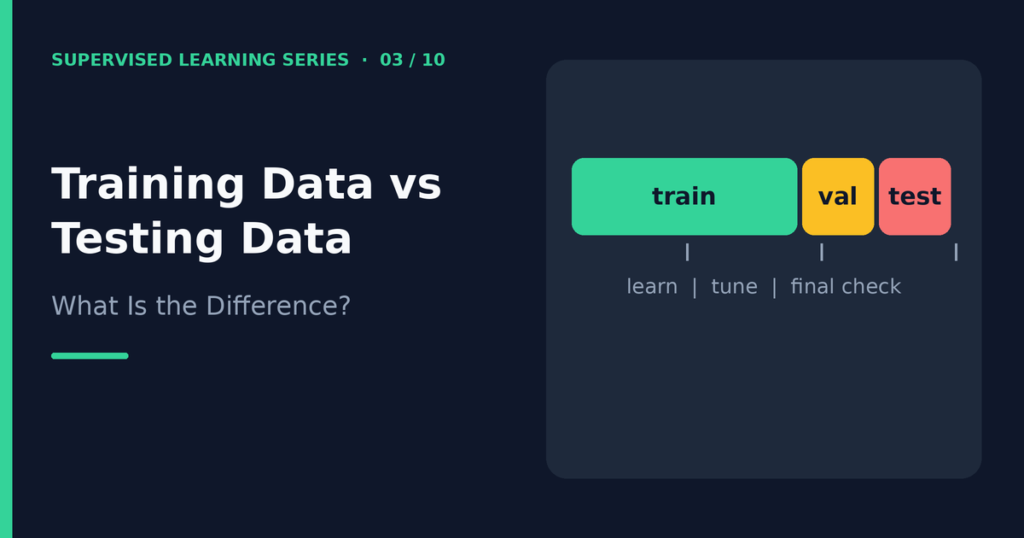
Training data is the part of your dataset that a model learns from. Testing data is a separate part that you hold back to check how well the model works on examples it has never seen. This difference is the core of fair model evaluation: a model that scores well on its own training data has told you very little, because it may simply have memorized the answers.
This article explains training data vs testing data, adds the third piece (validation data) that many beginners miss, and shows you how to split data correctly. You will also learn about stratified splits, time-based splits, cross-validation, and data leakage, which is the most common way these splits go wrong.
Table of contents
Why you must split your data
Imagine a teacher who gives students a practice exam and then uses the exact same questions on the final test. Everyone would score well, but the scores would not show who understood the subject. Machine learning has the same problem. If you test a model on the examples it trained on, a high score may only prove that the model remembered them.
What you actually want to know is how the model will perform on new data. Splitting the data lets you simulate that situation. The model learns from one portion, and you measure it on another portion that stayed hidden. The score on the hidden portion is your best estimate of real-world performance.
This idea connects directly to overfitting, where a model learns noise in the training data instead of real patterns. You can read more in Overfitting vs Underfitting in Machine Learning.
Training, validation, and test sets
Most projects use three sets of data. Each one has a different job.
| Set | Purpose | When you use it | Typical share |
|---|---|---|---|
| Training set | The model learns its parameters from these examples | During training | 60% to 80% |
| Validation set | You compare models and tune settings (hyperparameters) | During development, many times | 10% to 20% |
| Test set | You measure the final model’s performance once | At the very end | 10% to 20% |
Training data
The training data teaches the model. The algorithm sees both the features and the correct labels, and it adjusts its parameters to reduce its errors on these examples.
Validation data
Validation data helps you make choices. Suppose you want to know whether a decision tree with depth 3 or depth 8 works better. You train both on the training set and compare them on the validation set. Because you use the validation set to make decisions, it slowly “leaks” into your choices, and its score becomes a little optimistic.
Testing data
The test set gives the final, honest score. You do not use it to choose models or settings. If you peek at it repeatedly and adjust your model each time, the test set stops being independent, and you lose your unbiased estimate.
Some sources use the words “validation” and “test” loosely, or even swap them. When you read a tutorial, check how its author defines each term. In this series, “validation” always means the data used for tuning, and “test” always means the final check.
How to split a dataset
A common approach is a 60/20/20 or 70/15/15 split into training, validation, and test sets. For smaller datasets, many people use only a training and test split, such as 80/20, and use cross-validation on the training portion instead of a fixed validation set.
In scikit-learn, the train_test_split function performs one split at a time. To make three sets, call it twice: first to remove the test set, then to split the remainder into training and validation sets.
Always set random_state to a fixed number. This makes the split reproducible, so you and other readers get the same result each time you run the code. Shuffling is the default, and it protects you from ordered data, such as a file sorted by class.
Keep the test set locked away from the start. A good habit is to create it first, before any exploration or cleaning that learns from the data.
Stratified splitting
A random split can produce uneven classes by chance. Imagine a dataset where only 5% of examples are fraud. A random test set of 100 rows could contain 2 fraud cases or 9. Your score would then depend heavily on luck.
Stratified splitting fixes this. It keeps the same class proportions in every subset. If 5% of the full dataset is fraud, then about 5% of the training set, the validation set, and the test set will also be fraud. In scikit-learn, you pass stratify=y to train_test_split. Stratification applies to classification targets. For regression, the usual approach is a plain random split.
Time-based splitting
Some data has a time order: sales by day, sensor readings, or stock prices. A random split mixes the future with the past. The model would train on rows from next month and be tested on rows from last month, which never happens in real use.
For time-ordered data, split by time. Train on the earliest period, validate on the next period, and test on the most recent period. Scikit-learn offers TimeSeriesSplit for cross-validation that respects order. Each fold trains on the past and tests on the period right after it.
Cross-validation
A single split can mislead you, especially on a small dataset. If you get an unlucky test set, your score may be too high or too low. Cross-validation reduces this risk by repeating the split several times.
In k-fold cross-validation, you divide the training data into k equal parts called folds. You train k times. Each time, you hold out a different fold for validation and train on the other k minus 1 folds. You then average the k scores. Five or ten folds are common choices.
You still keep a final test set outside the cross-validation loop. A typical workflow uses cross-validation on the training data to compare models, then evaluates only the winning model once on the test set. Cross-validation also tells you how stable a score is, because you can look at the spread between folds.
Data leakage: the silent problem
Data leakage happens when information that the model should not have access to sneaks into training. The result is a score that looks great during development and falls apart in real use. The scikit-learn documentation defines it as using information during model building that would not be available at prediction time.
Leakage takes several common forms:
- Preprocessing before splitting. If you scale or fill missing values using statistics from the whole dataset, the test data influences the training process. Always fit these steps on the training data only, then apply them to the validation and test data.
- Feature selection before splitting. Choosing the “best” features by looking at all labels leaks label information into the model.
- Duplicate rows. If the same example appears in both training and test sets, the test is not independent.
- Target leakage. A feature that is only known after the outcome, such as a “refund issued” column when predicting refunds, gives away the answer.
- Related groups. If several rows come from the same patient or customer, put all of that person’s rows on one side of the split.
- Future information. With time data, using later rows to predict earlier ones leaks the future.
The easiest protection is a scikit-learn pipeline. A pipeline bundles preprocessing and the model together, so each step is fitted only on the training portion during every split. The Python tutorial in Build Your First Supervised Machine Learning Model with Python uses this approach.
Python example
The following code splits the breast cancer dataset (included with scikit-learn) into training, validation, and test sets with stratification. It then runs 5-fold cross-validation using a pipeline, and it prints the folds that TimeSeriesSplit creates for a tiny time-ordered array.
import numpy as np
from sklearn.datasets import load_breast_cancer
from sklearn.model_selection import train_test_split, cross_val_score, TimeSeriesSplit
from sklearn.pipeline import make_pipeline
from sklearn.preprocessing import StandardScaler
from sklearn.linear_model import LogisticRegression

X, y = load_breast_cancer(return_X_y=True)

# 60% train, 20% validation, 20% test, all stratified
X_tmp, X_test, y_tmp, y_test = train_test_split(
    X, y, test_size=0.2, stratify=y, random_state=42)
X_train, X_val, y_train, y_val = train_test_split(
    X_tmp, y_tmp, test_size=0.25, stratify=y_tmp, random_state=42)
print(len(X_train), len(X_val), len(X_test))
print("class share (all/train/val/test):",
      [round(float(v.mean()), 3) for v in (y, y_train, y_val, y_test)])

# The pipeline fits the scaler inside each fold, which avoids leakage
pipe = make_pipeline(StandardScaler(), LogisticRegression(max_iter=1000))
scores = cross_val_score(pipe, X_tmp, y_tmp, cv=5)
print("CV accuracy:", scores.round(3), "mean", round(scores.mean(), 3))

# Time-ordered folds: train on the past, test on the period right after it
for i, (tr, te) in enumerate(TimeSeriesSplit(n_splits=3).split(np.arange(12))):
    print("fold", i, "train", tr.tolist(), "test", te.tolist())
When I ran this code with scikit-learn 1.8.0, the output was:
341 114 114
class share (all/train/val/test): [0.627, 0.628, 0.623, 0.632]
CV accuracy: [0.967 0.978 0.967 1.    0.989] mean 0.98
fold 0 train [0, 1, 2] test [3, 4, 5]
fold 1 train [0, 1, 2, 3, 4, 5] test [6, 7, 8]
fold 2 train [0, 1, 2, 3, 4, 5, 6, 7, 8] test [9, 10, 11]
Notice three things. First, the sets contain 341, 114, and 114 rows, which matches the 60/20/20 plan. Second, the share of the positive class stays close to 0.63 in every subset, which shows that stratification worked. Third, in the time-based folds the training rows always come before the test rows.
Your exact numbers can differ slightly with other library versions or other random seeds.
Common mistakes
- Scoring on training data. The training score tells you how well the model fits known examples, not how it will behave on new ones.
- Tuning on the test set. If you adjust the model after every test score, the test set becomes part of training.
- Splitting too late. Cleaning, scaling, or selecting features on all data before the split leaks information.
- Ignoring class balance. Rare classes need stratified splits, or the test set may contain almost none of them.
- Random splits on time data. Use a time-based split whenever order matters.
- Using too small a test set. A tiny test set gives a noisy score. Consider cross-validation when data is scarce.
- Forgetting the random seed. Without a fixed seed, you cannot reproduce your results.
Frequently asked questions
What is the difference between training data and testing data?
Training data is what the model learns from, and testing data is what you use to measure the finished model. The test set must stay unseen during training and tuning, or its score will be too optimistic.
What is the best train-test split ratio?
No ratio is best for every project. Splits such as 80/20 or 70/30 are popular starting points. Larger datasets can afford a smaller test percentage, while small datasets benefit from cross-validation so that you use your data more efficiently.
Do I always need a validation set?
No. A validation set is useful when you compare many models or tune settings. If you use cross-validation on the training data, the validation folds play the same role, and you only need to keep a separate test set.
Can I use the test set more than once?
Try to use it once, for the final evaluation. Each extra look tempts you to adjust the model, and that gradually fits the model to the test set.
Why does my model score well in testing but badly in production?
Common causes include data leakage, a test set that does not resemble real data, and changes in the world since the data was collected. Check your splitting and preprocessing steps first.
Conclusion
The difference between training data and testing data is the difference between studying and taking the exam. Training data teaches the model, validation data guides your decisions, and test data delivers the final honest score. Stratified splits, time-based splits, and cross-validation each protect that honesty in different situations, and a pipeline protects you from leakage.
With your data split correctly, you can start learning algorithms. The next article, Linear Regression Explained with Examples, introduces your first regression model and uses the same split pattern you learned here.
This article is for educational and informational purposes only. Examples and code are provided to help readers understand how to split data for machine learning and may require adaptation for specific projects.
Related guides
Next, learn how to judge the results of a model in How to Evaluate a Supervised Learning Model, then review the foundations in What Is Supervised Learning?.
References and further reading
- Common pitfalls and recommended practices (scikit-learn) for data leakage and pipelines.
- Cross-validation: evaluating estimator performance (scikit-learn) for k-fold and time series splits.
- train_test_split documentation (scikit-learn) for the function parameters.