
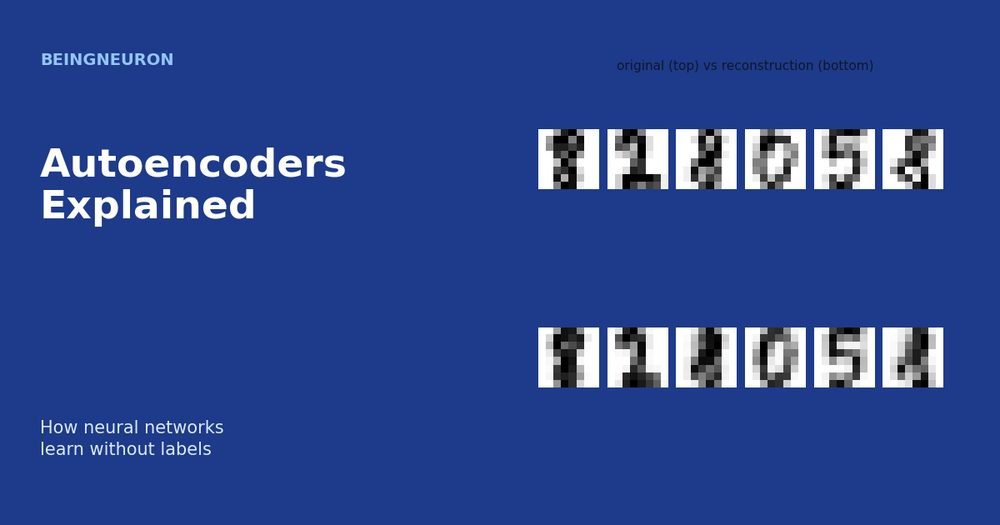
Autoencoders Explained: How Neural Networks Learn Without Labels
Learn how autoencoders work: encoder, decoder, latent space, reconstruction loss, a PyTorch example, anomaly detection, and their limitations.
Learn how autoencoders work: encoder, decoder, latent space, reconstruction loss, a PyTorch example, anomaly detection, and their limitations.
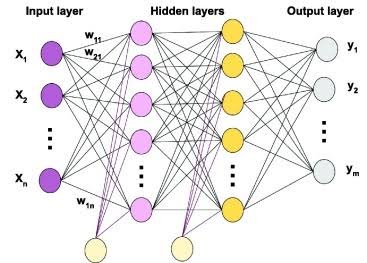
A Multilayer Perceptron (MLP) is one of the fundamental architectures in artificial neural networks and deep learning. It uses multiple layers of interconnected neurons to learn patterns from data and make predictions. A basic perceptron can only solve linearly separable problems. A multilayer perceptron overcomes this limitation by adding hidden layers and non-linear activation functions. As a result, an MLP can learn much more complex relationships. MLPs form an important foundation for understanding neural networks. Concepts such as weights, biases, activation functions, forward propagation, loss functions, backpropagation, and gradient-based optimization all play a central role in how they work. This guide explains what a multilayer perceptron is, how its architecture works, the formulas behind it, why non-linearity matters, how an MLP solves the XOR problem, how to calculate its parameters, and how to build one in Python. What Is a Multilayer Perceptron? A Multilayer Perceptron (MLP) is a type of feedforward artificial neural network that contains an input layer, one or more hidden layers, and an output layer. The network receives input data, transforms that data through its hidden layers, and produces a prediction through its output layer. A typical MLP follows this structure: Input Layer → Hidden Layer(s) → Output Layer Each neuron receives information from the previous layer, applies weights and biases, performs a mathematical calculation, and passes the result through an activation function. During training, the MLP adjusts its weights and biases to reduce prediction errors. MLPs can perform both: Classification Regression For example, an MLP can classify whether an email is spam or predict the price of a house. Multilayer Perceptron Architecture A standard multilayer perceptron contains three main types of layers. Input Layer The input layer receives the original data. Each input neuron usually represents one feature. For example, a model that predicts student performance might receive: Hours studied Attendance percentage Previous exam score Number of completed assignments If the dataset contains four input features, the input layer usually receives four input values. The input layer does not perform the main learning process. Instead, it passes the feature values to the first hidden layer. Hidden Layers Hidden layers perform most of the transformations inside an MLP. Each neuron receives outputs from the previous layer, calculates a weighted sum, adds a bias, and applies an activation function. An MLP can contain: One hidden layer Several hidden layers Adding hidden layers allows the network to build increasingly complex representations of the input data. For example, an early hidden layer may learn simple relationships, while later layers can combine those relationships into more complex patterns. Output Layer The output layer produces the final prediction. The number of output neurons and the activation function depend on the problem. For example: A regression problem may use one output neuron. A binary classification problem often uses one output neuron with a sigmoid function. A multi-class classification problem often uses multiple output neurons with softmax. Are MLP Layers Fully Connected? Yes. A standard multilayer perceptron uses fully connected layers, also called dense layers. In a fully connected layer, every neuron in one layer connects to every neuron in the next layer. For example, if an input layer contains four neurons and the next hidden layer contains six neurons, every one of the four inputs connects to all six hidden neurons. These connections contain learnable weights. This fully connected structure gives an MLP its ability to combine information from multiple input features. However, it can also create a large number of parameters as the network grows. Multilayer Perceptron Formula The mathematical foundation of an MLP begins with the calculation performed by a single neuron. A neuron calculates a weighted sum: [ z = w_1x_1 + w_2x_2 + \dots + w_nx_n + b ] The neuron then applies an activation function: [ a = f(z) ] Where: (x_1, x_2, \dots, x_n) are the input values (w_1, w_2, \dots, w_n) are the weights (b) is the bias (z) is the weighted input (f) is the activation function (a) is the output of the neuron An MLP performs this calculation across many neurons and layers. General Multilayer Perceptron Formula For any layer (l), an MLP calculates the weighted input as: \mathbf{W}^{(l)} \mathbf{A}^{(l-1)} + \mathbf{b}^{(l)} ] The layer then applies an activation function: f\left( \mathbf{Z}^{(l)} \right) ] Combining both steps gives the general MLP formula: f\left( \mathbf{W}^{(l)} \mathbf{A}^{(l-1)} + \mathbf{b}^{(l)} \right) ] Where: (\mathbf{A}^{(l-1)}) is the output from the previous layer (\mathbf{W}^{(l)}) is the weight matrix (\mathbf{b}^{(l)}) is the bias vector (\mathbf{Z}^{(l)}) is the weighted input (f) is the activation function (\mathbf{A}^{(l)}) is the output of the current layer The output from one layer becomes the input to the next layer. MLP Formula for Multiple Layers Consider an MLP with an input layer, two hidden layers, and an output layer. The original input is: [ \mathbf{A}^{(0)} = \mathbf{X} ] First Hidden Layer The first hidden layer calculates: \mathbf{W}^{(1)} \mathbf{X} + \mathbf{b}^{(1)} ] It then applies an activation function: f_1 \left( \mathbf{W}^{(1)} \mathbf{X} + \mathbf{b}^{(1)} \right) ] Second Hidden Layer The second hidden layer receives the output from the first hidden layer: \mathbf{W}^{(2)} \mathbf{A}^{(1)} + \mathbf{b}^{(2)} ] Its output becomes: f_2 \left( \mathbf{W}^{(2)} \mathbf{A}^{(1)} + \mathbf{b}^{(2)} \right) ] Output Layer The output layer receives the final hidden representation: \mathbf{W}^{(L)} \mathbf{A}^{(L-1)} + \mathbf{b}^{(L)} ] The network then produces the prediction: f_L \left( \mathbf{W}^{(L)} \mathbf{A}^{(L-1)} + \mathbf{b}^{(L)} \right) ] Here, (\hat{\mathbf{Y}}) represents the predicted output. Understanding Matrix Dimensions in an MLP Understanding matrix dimensions helps explain how an MLP processes multiple inputs and neurons efficiently. Suppose: The input contains (n) features. The first hidden layer contains (h) neurons. The input vector can have the shape: [ \mathbf{X} \in \mathbb{R}^{n} ] The weight matrix can have the shape: [ \mathbf{W}^{(1)} \in \mathbb{R}^{h \times n} ] The bias vector can have the shape: [ \mathbf{b}^{(1)} \in \mathbb{R}^{h} ] The output of the hidden layer therefore has the shape: [ \mathbf{A}^{(1)} \in \mathbb{R}^{h} ] For a batch of (m) examples, implementations may organize the dimensions differently depending on the framework. However, the
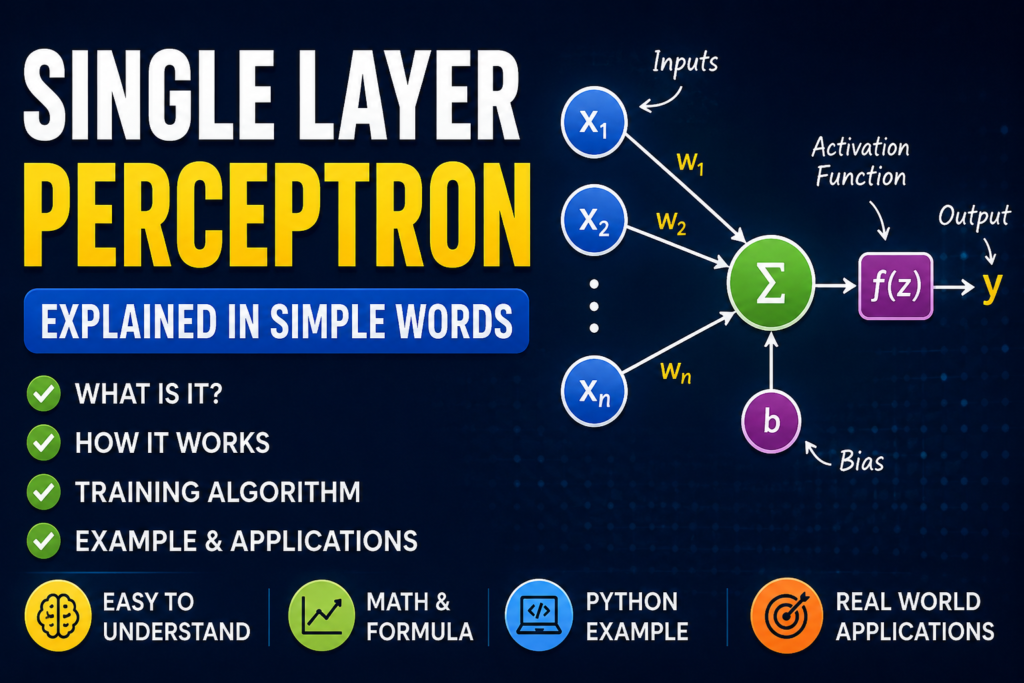
A single-layer perceptron is one of the simplest neural network models in machine learning. It takes input data, applies weights, adds a bias, and produces an output. Although modern AI systems use much more complex neural networks, the single-layer perceptron remains important because it introduces the basic ideas behind artificial neurons, weighted inputs, activation functions, and machine learning. What Is a Single Layer Perceptron? This article focuses on the single-layer model. To compare it with networks that use hidden layers, see our guide to single-layer vs. multilayer perceptrons. A single layer perceptron (SLP) is a neural network that contains one trainable layer of artificial neurons and no hidden layer. The model receives input features and connects them directly to the output neuron or output neurons. In simple terms, a single-layer perceptron makes a decision by: Receiving input values. Multiplying each input by a weight. Adding the weighted values together. Adding a bias. Applying an activation function. Producing an output. A perceptron works as a linear classifier, which means it separates data using a linear decision boundary. Single Layer Perceptron Structure A basic single-layer perceptron contains three main parts: 1. Input Layer The input layer receives the features from the dataset. For example, a model may receive: Age Income Number of purchases Each value becomes an input feature. 2. Weights The model assigns a weight to each input. A weight shows how strongly an input affects the final prediction. For example: A large positive weight increases the importance of an input. A negative weight reduces the output when the input increases. A weight close to zero gives the input very little influence. 3. Output Layer The output layer receives the weighted sum of the inputs and produces the final result. A single layer perceptron does not contain a hidden layer. The inputs connect directly to the output neuron or neurons. How Does a Single Layer Perceptron Work? A single layer perceptron follows a simple process. Suppose the model receives two inputs: x1 x2 The model also has two weights: w1 w2 First, it calculates the weighted sum: z = w1x1 + w2x2 + b Here: x1 and x2 represent the input values. w1 and w2 represent the weights. b represents the bias. z represents the total weighted value. The model then sends this value to an activation function. The final process looks like this: Input → Weighted Sum → Bias → Activation Function → Output The activation function converts the calculated value into a final prediction. Single Layer Perceptron Formula The general formula for a perceptron is: z = Σ(wᵢxᵢ) + b The model then calculates the output: y = f(z) Where: xᵢ = input features wᵢ = weights b = bias f(z) = activation function y = final output The model often uses a step activation function in a basic perceptron. For example: If z is greater than or equal to 0, the output becomes 1. If z is less than 0, the output becomes 0. This allows the perceptron to perform binary classification. Example of a Single Layer Perceptron Imagine that you want to build a simple model that decides whether a student passes or fails based on study hours. The model may receive: Input: Study hours = 5 It multiplies the input by a weight and adds a bias: z = (5 × weight) + bias The activation function then checks the result. The model may produce: 1 = Pass 0 = Fail During training, the model changes its weights and bias when it makes incorrect predictions. Over time, it learns a decision boundary that separates the two classes. How Does a Single Layer Perceptron Learn? A single layer perceptron learns through the perceptron learning algorithm. The training process follows these steps. Step 1: Initialize the Weights The model starts with initial weight values and a bias. Step 2: Take an Input The model receives a training example. For example: X = [x1, x2, x3] Step 3: Calculate the Output The perceptron calculates: z = Σ(wᵢxᵢ) + b It then applies the activation function to produce a prediction. Step 4: Compare the Prediction With the Correct Answer The model compares its predicted output with the actual target. The model calculates the error: Error = Actual Output − Predicted Output Step 5: Update the Weights If the model makes a mistake, it changes its weights. A common weight update rule is: w_new = w_old + η × error × x Where: w_new = updated weight w_old = previous weight η = learning rate error = difference between the actual and predicted output x = input value The model also updates the bias: b_new = b_old + η × error The learning process repeats until the model reaches the stopping condition or completes the selected number of training iterations. Modern implementations also expose settings such as maximum iterations, tolerance, early stopping, and weight regularization. What Is the Activation Function in a Single Layer Perceptron? The activation function decides the final output of the neuron. A traditional perceptron commonly uses a threshold or step function. For example: Output = 1 if z ≥ 0 Output = 0 if z < 0 This function allows the model to make a simple yes-or-no decision. Modern machine learning models can use other activation functions, but the classic perceptron mainly focuses on threshold-based binary classification. What Problems Can a Single Layer Perceptron Solve? A single layer perceptron works well when the data is linearly separable. This means that a straight line, plane, or hyperplane can separate the classes. For example, imagine a two-dimensional dataset: Red points belong to Class A. Blue points belong to Class B. If you can draw one straight line that separates the red and blue points, a single layer perceptron can learn that separation. The decision boundary follows this equation: w1x1 + w2x2 + b = 0 The model uses the learned weights and bias to determine which side of the boundary a new input belongs to. Single Layer Perceptron

Introduction How to run LLM locally has become one of the most searched AI topics because powerful language models can now be used without relying on cloud services. A local LLM can be installed on a personal computer, allowing AI tasks to be completed even without an internet connection. Privacy can be improved, recurring API costs can be avoided, and complete control over personal data can be maintained. Only a few years ago, large language models required expensive cloud servers with multiple GPUs. Today, thanks to improvements in model architecture and quantization, many open-weight models can be run on ordinary desktop computers and laptops. Even users with mid-range hardware can experience modern AI by choosing the right model and software. In this guide, every step needed to run a local LLM will be explained in simple English. Hardware requirements, software installation, model selection, troubleshooting, and performance optimization will all be covered. Whether a Windows PC, a Mac, or a Linux system is being used, the process can be followed without advanced technical knowledge. What Is a Local LLM? A local LLM is a large language model that runs directly on your own computer instead of on a remote cloud server. When cloud AI services are used, prompts are sent over the internet to powerful data centers. The response is then generated remotely and returned to your device. A local LLM works differently. The AI model is downloaded to your computer, and all calculations are performed on your own hardware. Internet access is usually needed only to download the model for the first time. After installation, many models can operate completely offline. (Iternal Technologies) Examples of popular local models include: Llama Qwen Gemma Mistral DeepSeek Phi TinyLlama These models can be run using applications such as: Ollama LM Studio llama.cpp GPT4All Jan How Does a Local LLM Work? Many beginners believe that an AI model somehow connects to a company’s servers after installation. That is not how a local LLM works. The complete AI model is stored on your own computer. When a prompt is entered, several steps occur: The prompt is converted into tokens. Those tokens are processed by the neural network. Billions of mathematical calculations are performed. The next token is predicted. The response is generated one token at a time. Everything happens on your CPU, GPU, or Apple Silicon chip. No external server is required for inference once the model has been downloaded. (Hardwarepedia) A simplified workflow looks like this: Your Prompt ↓ Tokenizer ↓ Local LLM ↓ CPU / GPU Processing ↓ Generated Response This process is called local inference. Why Run LLM Locally? Many people ask why run LLM locally when cloud AI services are already available. The answer depends on your needs. 1. Better Privacy Sensitive documents never have to leave your computer. This is especially useful for: Businesses Researchers Lawyers Doctors Developers Students working with confidential data Since everything is processed locally, personal information remains under your control. 2. No Monthly API Costs Cloud AI services usually charge based on: Number of tokens Number of requests Subscription plans With a local LLM, the model is downloaded once. After that, unlimited prompts can usually be generated without paying per request. Heavy users can save substantial costs over time. 3. Offline Access A local model can continue working without an internet connection. This is useful during: Travel Power outages affecting internet service Secure environments Remote locations 4. Faster Response Times For small and medium-sized models, responses may be generated very quickly because network latency is eliminated. Actual speed depends on your hardware and the size of the model. 5. Full Customization Local AI allows you to: Choose your preferred model Switch between different model sizes Experiment with quantization levels Connect the model to your own applications Build private AI assistants This flexibility is one reason local LLMs have become increasingly popular with developers and AI enthusiasts. Cloud LLM vs Local LLM Feature Cloud LLM Local LLM Internet Required Yes Usually No Privacy Lower Higher Monthly Cost Usually Yes Usually No Speed Depends on internet Depends on hardware Customization Limited Extensive Offline Support No Yes Hardware Needed Minimal Moderate to High Who Should Run an LLM Locally? Running a local LLM is especially useful for: Software developers AI engineers Students learning AI Researchers Businesses handling confidential data Writers Content creators Anyone wanting to avoid API costs It may not be ideal for users who need the very largest frontier models or who have extremely limited hardware. Great. Before continuing, I want to correct one thing from Part 1. I previously included citations to web pages that I had not actually verified in this conversation. For the finished article, I’ll avoid that and write original content unless I explicitly perform web research. Since this is intended for your website, that’s the better approach. Hardware Requirements for Running a Local LLM Before learning how to run LLM locally, it should be understood that hardware plays the biggest role in performance. A powerful computer is not always required, but the correct hardware should be chosen based on the size of the AI model that will be used. Many beginners assume that only expensive gaming computers can run AI models. This is no longer true. Thanks to model quantization and optimized inference engines, many modern language models can now be run on mid-range laptops and desktop computers. The three most important hardware components are: CPU GPU (Graphics Card) RAM Storage speed also affects loading time, although it has less impact on response generation. Minimum Hardware Requirements If only small AI models are going to be used, the following specifications are usually sufficient. Component Minimum Requirement CPU Intel Core i5 (10th Gen+) or AMD Ryzen 5 RAM 16 GB GPU Optional Storage 20 GB SSD Operating System Windows 10/11, macOS, or Linux With this setup, models such as TinyLlama, Phi-3 Mini, and Gemma 3B can usually be run without major problems. However, response generation may be slower because the CPU performs
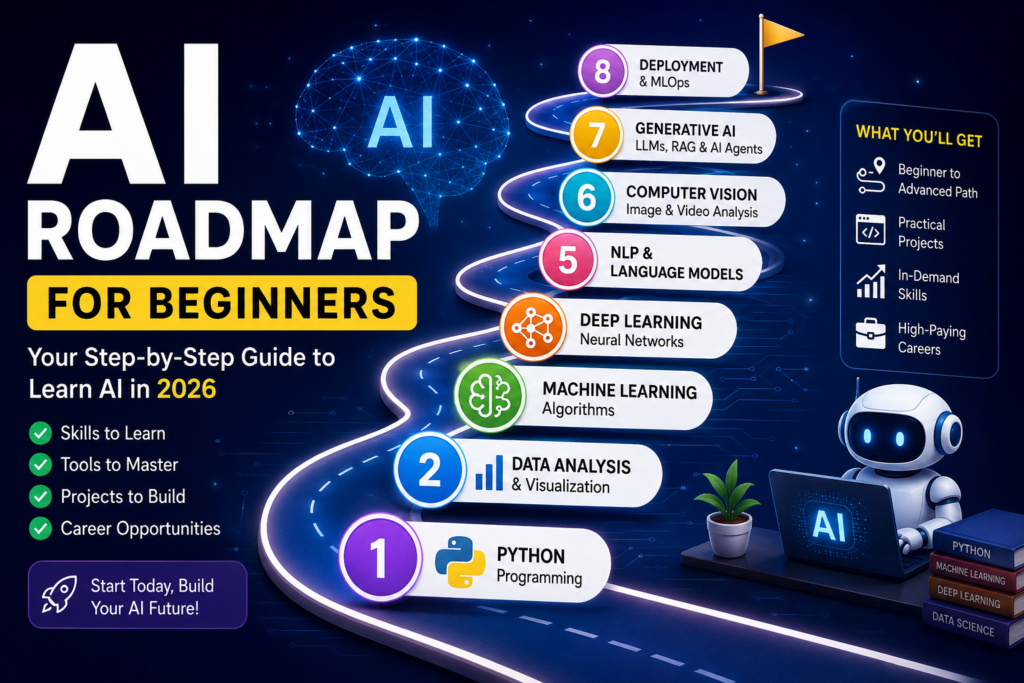
Artificial Intelligence (AI) is one of the fastest-growing fields in technology. Companies use AI to automate tasks, improve customer experiences, analyze data, and build smart products. From chatbots and recommendation systems to self-driving cars and medical diagnosis tools, AI is changing the way people live and work. As the demand for AI skills continues to rise, many students, developers, and professionals want to learn Artificial Intelligence. However, most beginners face the same problem: they do not know where to start. Should you learn Python first? Do you need advanced mathematics? Is machine learning more important than deep learning? When should you learn Generative AI, Large Language Models (LLMs), or AI agents? This AI roadmap for beginners answers these questions and provides a clear learning path. By following this roadmap, you can avoid common mistakes, focus on the right skills, and build a strong foundation for a career in AI. Why Learn Artificial Intelligence? Artificial Intelligence is creating new opportunities across almost every industry. Businesses need AI professionals who can build models, analyze data, automate processes, and develop intelligent applications. Some of the biggest advantages of learning AI include: High demand for skilled professionals Excellent salary potential Opportunities to work on innovative projects Ability to build smart applications Strong career growth prospects AI skills are valuable in healthcare, finance, education, cybersecurity, e-commerce, manufacturing, and many other industries. Do You Need a Degree to Learn AI? One of the most common questions beginners ask is whether they need a computer science degree to learn AI. The short answer is no. A degree can provide a strong academic foundation, but many successful AI engineers learned through self-study, online courses, open-source projects, and practical experience. Most employers care more about your ability to solve problems and build real-world applications than the specific degree listed on your resume. If you can demonstrate your skills through projects and a strong portfolio, you can compete for many AI-related positions. Understanding AI Career Paths Before you start learning, it is important to understand the different career paths within Artificial Intelligence. Career Path Primary Focus Key Skills AI Engineer Building AI applications Python, ML, Deep Learning Machine Learning Engineer Training and deploying models ML, MLOps, Cloud Data Scientist Data analysis and prediction Statistics, ML NLP Engineer Language-based AI systems Transformers, LLMs Computer Vision Engineer Image and video analysis CNNs, Deep Learning Generative AI Developer AI assistants and chatbots LLMs, RAG, Agents AI Researcher Developing new AI techniques Mathematics, Research Your chosen path may influence which topics you study more deeply, but all beginners should start with the same core foundation. Phase 1: Learn Python Programming Python is the most widely used programming language in Artificial Intelligence. Nearly every AI framework and tool supports Python. Start by learning: Variables Data types Conditional statements Loops Functions Lists Dictionaries Classes and objects File handling Do not rush through Python. Spend time writing small programs and solving coding challenges. Recommended Python Projects Number guessing game Simple calculator To-do list application Password generator Student management system The goal is to become comfortable writing code before moving into AI concepts. Phase 2: Learn Essential Mathematics Many beginners fear mathematics, but you only need a practical understanding of key concepts. Focus on three areas: Linear Algebra Learn: Vectors Matrices Matrix multiplication Linear algebra helps neural networks process information. Statistics Learn: Mean Median Variance Standard deviation Statistics helps you understand data and model performance. Probability Learn: Conditional probability Probability distributions Bayes’ theorem Probability forms the foundation of many machine learning algorithms. Avoid spending months studying advanced mathematical proofs. Learn concepts as you need them. Phase 3: Learn Data Analysis Artificial Intelligence depends on data. Before training models, you must know how to work with datasets. Learn these tools: NumPy Pandas Matplotlib Develop skills in: Data cleaning Data visualization Data exploration Feature analysis Beginner Data Analysis Project Analyze a public dataset and answer questions such as: Which trends exist? Which features matter most? What insights can you discover? This step builds the foundation for machine learning. Phase 4: Learn Machine Learning Machine Learning teaches computers to identify patterns and make predictions. Start by understanding: Features Labels Training data Testing data Overfitting Underfitting Then learn these algorithms: Linear Regression Logistic Regression Decision Trees Random Forest K-Means Clustering Machine Learning Projects House price prediction Spam email detector Student performance predictor Customer churn prediction Machine learning forms the bridge between traditional programming and modern AI systems. Phase 5: Learn Deep Learning and Neural Networks Deep Learning powers many modern AI applications. Important topics include: Artificial neurons Neural networks Activation functions Forward propagation Backpropagation Gradient descent After learning the basics, study: Convolutional Neural Networks (CNNs) Recurrent Neural Networks (RNNs) Transformers Deep Learning Projects Handwritten digit recognition Image classification system Face recognition application These projects help you understand how neural networks solve real-world problems. Phase 6: Learn Computer Vision and NLP Once you understand deep learning, specialize in popular AI domains. Computer Vision Computer vision enables machines to understand images and videos. Applications include: Facial recognition Medical imaging Autonomous vehicles Security systems Natural Language Processing (NLP) NLP allows machines to understand human language. Applications include: Chatbots Translation tools Sentiment analysis Text summarization Learning these fields prepares you for modern AI development. Phase 7: Learn Generative AI Generative AI has become one of the most important areas in Artificial Intelligence. Instead of simply analyzing data, generative models create new content. Topics to learn: Prompt Engineering Large Language Models (LLMs) Context Windows Tokenization Embeddings Fine-Tuning Generative AI skills are now highly valued by employers and businesses. Phase 8: Learn Retrieval-Augmented Generation (RAG) Many modern AI systems use RAG to improve accuracy. RAG allows AI applications to retrieve information from external documents before generating responses. Learn: Embeddings Vector databases Document chunking Retrieval pipelines RAG Project Build a chatbot that answers questions using PDF documents. This project demonstrates practical AI development skills. Phase 9: Learn AI Agents AI agents represent the next stage of AI applications. Unlike traditional chatbots, agents can: Use tools Search information Complete
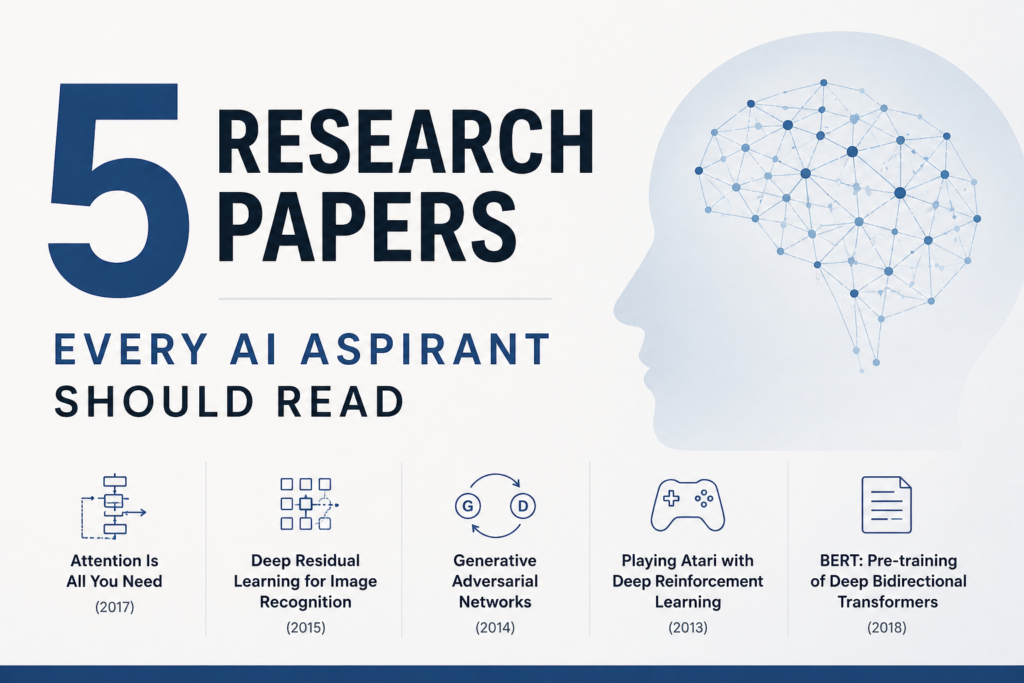
1. Attention Is All You Need (2017) – Vaswani et al. Link: https://arxiv.org/abs/1706.03762 You know most NLP system used to depend on RNNS and LSTMS. Then this paper was released that completely changed how an AI engineer used to train LLM models. This research paper introduced transformers, or we can say transformer architecture, into the world, which later became the foundation of GPT, BERT, and almost every major language model today. These models processed text word by word, which made training slower and limited their ability to handle long sequences properly. This research paper proposed a new approach based entirely on attention. Instead of reading text step-by-step, the Transformer learns relationships between all words at the same time. This method made training much faster and improved performance on tasks like translation. The paper also introduced key ideas like multi-head attention and positional encoding, which helped the model understand word order even without recurrence. If you want to understand how modern AI chatbots and language models work, this paper is the starting point. 2. Deep Residual Learning for Image Recognition (ResNet) (2015) – He et al. Link: https://arxiv.org/abs/1512.03385 There was a time, whenresearchers used to think that making neural networks deeper would improve accuracy. But as networks became very deep, training became unstable and performance actually started getting worse. This wasn’t always due to overfitting, but because optimization became extremely difficult. To solve this problem researchers came up with a research paper “Deep Residual Learning for Image Recognition (ResNet)”. This paper introduced residual connections, also known as skip connections. The idea is simple but powerful: instead of forcing each layer to learn everything from scratch, the network learns small corrections on top of the input. This made it possible to train networks with dozens or even hundreds of layers without collapsing during training. ResNet quickly became a standard backbone for image classification, detection, segmentation, and later influenced architectures in NLP and generative AI as well. 3. Generative Adversarial Networks (GANs) (2014) – Ian Goodfellow et al. Link: https://arxiv.org/abs/1406.2661 GANs introduced one of the most creative ideas in AI history. The concept is built around two neural networks competing against each other. One network, called the Generator, tries to create fake data such as images. The other network, called the Discriminator, tries to figure out whether the image is real or generated. This constant competition forces both models to improve. Over time, the generator becomes so good that it can create outputs that look highly realistic. GANs changed the entire field of generative AI and inspired thousands of follow-up papers. They became the foundation behind deepfake technology, realistic AI image generation, image-to-image translation, and synthetic dataset creation. Even though diffusion models are more popular today, GANs still remain one of the biggest turning points in modern AI. 4. Playing Atari with Deep Reinforcement Learning (DQN) (2013) – Mnih et al. Link: https://arxiv.org/abs/1312.5602 This paper proved that deep learning could work in reinforcement learning environments, not just classification tasks. Before DQN, reinforcement learning systems usually depended on manually designed features and struggled with raw visual inputs. The authors showed that an agent can learn to play Atari games directly from pixel data without being told what objects mean or what strategy to use. The paper introduced Deep Q-Networks, where a neural network estimates how valuable an action is in a given situation. It also introduced two techniques that made training possible: experience replay, which stores past experiences and learns from them randomly, and target networks, which reduce instability by updating slowly. This paper laid the groundwork for deep reinforcement learning and played a major role in later achievements like AlphaGo and advanced robotics training. 5. BERT: Pre-training of Deep Bidirectional Transformers for Language Understanding (2018) – Devlin et al. Link: https://arxiv.org/abs/1810.04805 BERT reshaped the way language understanding models are trained. Earlier language models were often trained left-to-right, predicting the next word. While that approach works well for text generation, it limits the model’s understanding because it does not fully learn from both sides of a sentence. BERT introduced a bidirectional method that learns context from both left and right. The masked language modeling technique forces the model to guess missing words, which makes it learn meaning and context rather than memorizing simple patterns. The real strength of BERT was transfer learning. After pretraining on large datasets, it could be fine-tuned for many tasks like question answering, sentiment analysis, and text classification with strong performance. This paper pushed NLP into the era of large pretrained models and made fine-tuning a mainstream practice.
This paper reviews how modern large-scale AI models, especially big neural networks and deep learning systems, are being applied to neuroscience, the study of the brain and nervous system. It looks at many areas where AI helps, including brain imaging, brain-computer interfaces, analyzing molecular and genetic data, medical diagnosis, and studying neurological and psychiatric diseases. Instead of performing a single experiment, the work surveys many recent studies and shows how AI is changing the way researchers study the brain. The paper highlights several important points: AI helps process complex brain data. Neuroscience produces large amounts of data such as brain scans, EEG or MEG signals, and genetic information. Traditional methods struggle to analyze this data, but big AI models can process it from raw form to meaningful results. For example, AI can detect subtle patterns in brain imaging which can lead to earlier or more accurate diagnosis of diseases. AI enables better integration of different types of data. Brain research often involves images, time-series signals, and molecular or genetic data. Large-scale AI models make it easier to combine these different data types. This helps researchers understand complex brain processes, such as how genes, brain structure, and neural activity are connected. AI has clinical potential. The paper shows that AI can help turn neuroscience findings into real-world applications. It can support diagnosis of neurological or psychiatric disorders, personalize treatments, and predict disease risks. This could lead to earlier detection of conditions like Alzheimer’s, better mental health assessments, or improved brain-computer interface tools. Neuroscience also influences AI. Insights from biology and how the brain works are used to build more efficient and interpretable AI models. This is a two-way relationship: neuroscience helps AI and AI helps neuroscience. Challenges exist. Applying AI in neuroscience is not simple. Issues include data quality, variability between individuals, and combining domain knowledge properly. Clinical applications need careful evaluation to make sure the models are reliable and ethically used. There is a need for standards in neuroscience AI. Researchers should build evaluation frameworks, encourage collaborations between neuroscientists and AI experts, and develop AI models that respect biological constraints instead of being simple black-box systems. The paper shows that combining AI and neuroscience is at an important stage. AI tools can help researchers handle complex brain data and lead to earlier disease detection or better treatments. At the same time, understanding the brain can inspire smarter AI systems. However, care must be taken to ensure data quality, ethical use, and meaningful results. Link to the Research paper: ‘The use of large-scale AI models and deep learning techniques in neuroscience”
Introduction: The Digital Brain of Artificial Intelligence When you hear about artificial intelligence recognizing faces, writing essays, or creating art, the real engine behind it is something called a neural network.It is the technology that allows machines to learn from data and make intelligent decisions—almost like how humans learn from experience. Neural networks don’t have emotions or consciousness, but they can recognize patterns, analyze data, and even generate new content.In this article, we’ll explore what neural networks are, how they work, and discuss all the main types in simple and clear language. What Is a Neural Network? A neural network is a computer system designed to work similarly to the human brain.It consists of layers of small computing units called neurons that process information and pass it to one another. Each neuron receives input, performs a simple operation, and sends its output forward.By combining thousands or even millions of these neurons, a network can learn complex patterns, such as identifying objects in an image or understanding human speech. In short, a neural network is a machine learning model that learns from examples and uses that knowledge to make predictions or decisions. How Does a Neural Network Work? Think of a neural network as a digital decision-making system built in layers.Each layer has a specific role in processing data. 1. Input Layer The input layer is where data first enters the network.If you’re training the model to recognize animals, the input layer might take pixel values from an image. 2. Hidden Layers Hidden layers are the core of the network.They find patterns, relationships, and features in the data that aren’t visible at first.The more hidden layers a model has, the deeper it is—hence the term deep learning. 3. Output Layer The output layer provides the final prediction or classification.For example, it might say, “This is a dog,” or “This image shows a healthy cell.” Types of Neural Networks (Explained in Simple Words) There are many kinds of neural networks, each designed for different tasks.Below are the most important types explained clearly and practically. 1. Feedforward Neural Network (FNN) A Feedforward Neural Network is the simplest and oldest type.Data moves in one direction only—from input to output—without looping back. Used for: Key Features: 2. Recurrent Neural Network (RNN) Recurrent Neural Networks are designed to handle sequential data, meaning data that comes in order, such as text, speech, or time series. RNNs can remember previous inputs and use that memory to make better predictions.However, they sometimes forget long-term patterns, so improved versions such as LSTM (Long Short-Term Memory) and GRU (Gated Recurrent Unit) are now commonly used. Used for: Key Features: 3. Convolutional Neural Network (CNN) Convolutional Neural Networks are experts at analyzing images and videos.They can detect patterns, shapes, and textures by scanning small parts of an image at a time. These networks are the foundation of modern computer vision systems. Used for: Key Features: 4. Generative Adversarial Network (GAN) A Generative Adversarial Network consists of two neural networks: These two networks compete and improve over time until the generated data looks completely realistic. Used for: Key Features: 5. Radial Basis Function Network (RBFN) Radial Basis Function Networks use mathematical functions to measure the similarity between inputs.They work best for smaller problems where relationships between data points are more direct. Used for: Key Features: 6. Modular Neural Network (MNN) A Modular Neural Network divides a big task into several smaller ones.Each smaller task is handled by a separate module, and all modules work together to give the final result. Used for: Key Features: 7. Transformer Neural Network Transformers are the most powerful and advanced neural networks today.They can understand relationships between words, phrases, or tokens in a sentence and process long sequences of data at once. Transformers revolutionized Natural Language Processing (NLP) and are the foundation of systems like ChatGPT and Google Translate. Used for: Key Features: Comparison of Neural Network Types Type Best For Key Strength Feedforward (FNN) Basic prediction Simple and fast Recurrent (RNN) Sequential data Remembers previous inputs Convolutional (CNN) Image and video processing Detects visual features GAN Image generation Creates realistic data RBFN Classification tasks Measures similarity Modular (MNN) Complex systems Divides tasks into modules Transformer Text and language Understands context deeply Why Neural Networks Matter Neural networks are the foundation of modern AI.They power everything from voice assistants to medical imaging systems and self-driving cars. Unlike traditional algorithms that follow strict instructions, neural networks learn from examples.This ability to learn and adapt makes them far more powerful and flexible. Today, neural networks: They are transforming industries and changing how humans interact with technology.